Backup Hermes Agent
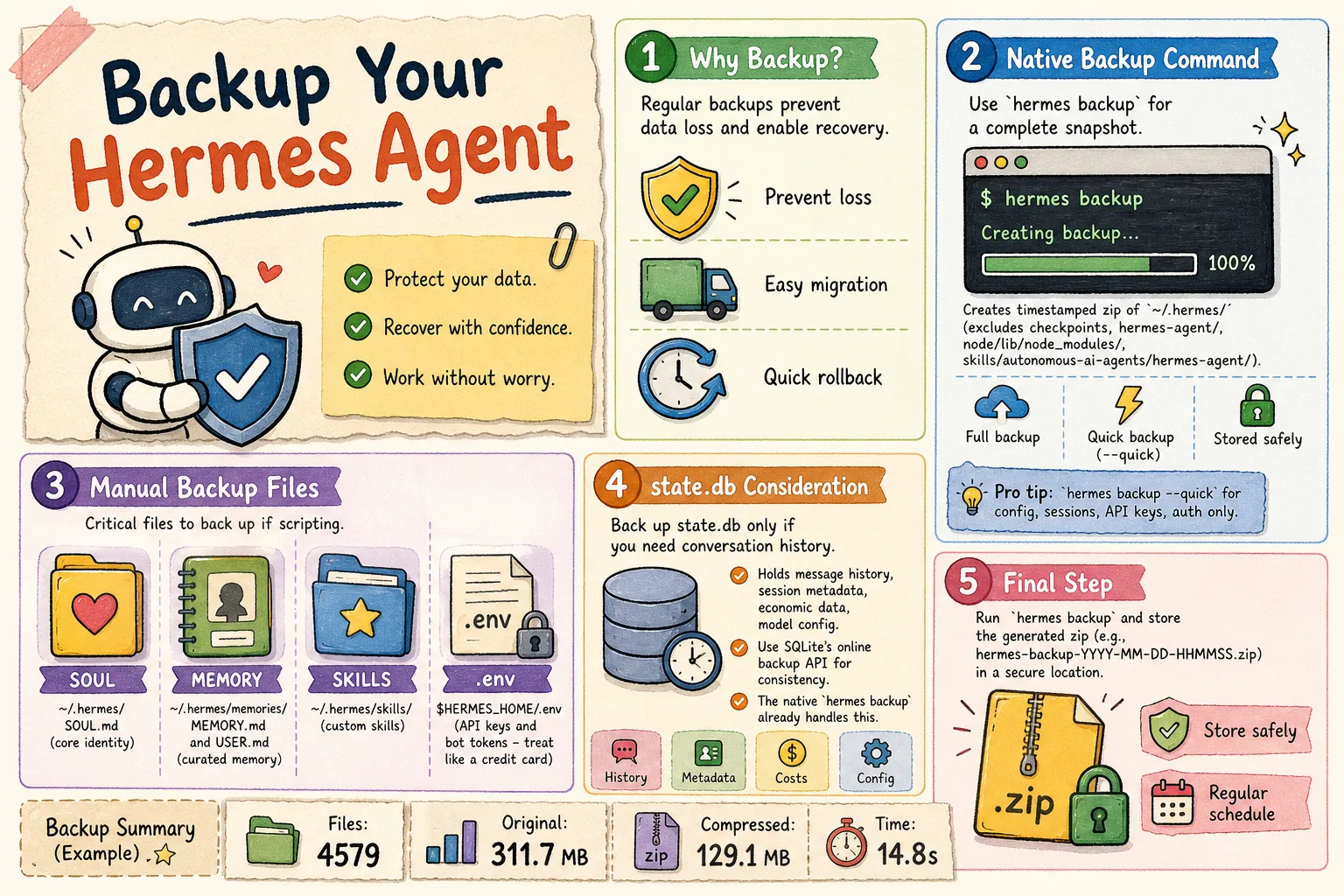
Key idea: Back up your ~/.hermes directory regularly. Use hermes backup for a full snapshot, or hermes backup --quick for just the critical files. Store the zip somewhere safe.
Why You Should Backup Regularly
You’ve heard it a thousand times — back up your data. I run mine daily. Here’s why it matters:
- Back up before things go wrong (crashes happen)
- Migrate to a new machine when you upgrade
- Roll back when something breaks
Back Up Your Current Hermes Data
Native backup command in Hermes
Hermes stores its core memory, persona, and configs in ~/.hermes/.
The built-in CLI creates a complete, timestamped archive:
hermes backupYou’ll see something like:
hermes backup
Scanning ~/.hermes ...
Backing up 4579 files ...
  500/4579 files ...
  ...
  4500/4579 files ...

Backup complete: /home/jeff/hermes-backup-2026-06-01-101955.zip
  Files:       4579
  Original:    311.7 MB
  Compressed:  129.1 MB
  Time:        14.8s

  Excluded directories:
    checkpoints/
    hermes-agent/
    node/lib/node_modules/
    skills/autonomous-ai-agents/hermes-agent/

Restore with: hermes import hermes-backup-2026-06-01-101955.zip
Pro tip: If you only need the essentials — config, sessions, API keys, and auth — use the --quick flag. It’s way faster and skips the full file scan:
hermes backup --quickThe native command uses SQLite’s backup() API under the hood, so it works safely even when Hermes is running.
Manual / Scripted Backup
If you want to roll your own backup script, grab these files:
~/.hermes/SOUL.md— your agent’s core identity (personality, tone, boundaries)~/.hermes/memories/MEMORY.mdand~/.hermes/memories/USER.md— the agent’s curated cross-session memory: environment facts, conventions, and your personal preferences~/.hermes/skills/— custom skills and auto-learned capabilities$HERMES_HOME/.env— API keys and bot tokens. Treat this like a credit card. When Hermes asks for permission to read it — so it can reach models outside your local network — make sure you understand what you’re approving. In most cases I only grant access once.
The native hermes backup command already handles all of the above. But if you’re scripting it yourself, or you want extra control over what goes where, these are the critical pieces.
A note about skills and cache output
Custom skills sometimes dump their output (generated articles, images, etc.) into ~/.hermes/skills/ or ~/.hermes/cache/ if the skill didn’t specify an output directory. This is easy to miss — you might not even find those files after the job finishes. Check both directories if you’re looking for something a skill produced.
~/.hermes/state.db — Should You Back It Up?
You probably don’t need to back up the database if you just chat. But if you care about your conversation history — say you want to search past sessions or build a semantic index — then definitely keep a copy. Here’s what’s inside:
Core data categories
The database holds:
- Message History — every user message, agent reply, reasoning step, tool call, and tool result
- Session Metadata — IDs, titles, source platforms (CLI, Telegram, Discord, etc.), timestamps
- Economic Data — input/output token counts and estimated dollar cost per session
- Model Configuration — the model name, system prompt, and config used for each session
Database structure
From the official docs, the schema has:
sessions— metadata, token counts, billing infomessages— full message history per sessionmessages_fts/messages_fts_trigram— FTS5 virtual tables for fast full-text search across every conversationstate_meta— a simple key-value table for general metadata
If you do decide to back it up, always use SQLite’s online backup API instead of a direct file copy — that keeps the database consistent. The native hermes backup command already handles this for you.
So go run hermes backup and store that zip somewhere safe.