Why I Started Using Brave Alongside Firefox (and What I Found)
Disclaimer
- All personal preference and experience. Your experience may differ from mine.
- Not a comprehensive review — just what I ran into during my own trial.
- I may be wrong about some things. This is personal practice, not gospel.
- There is a little learning curve.
- There is always trade-off when you gain benefit.
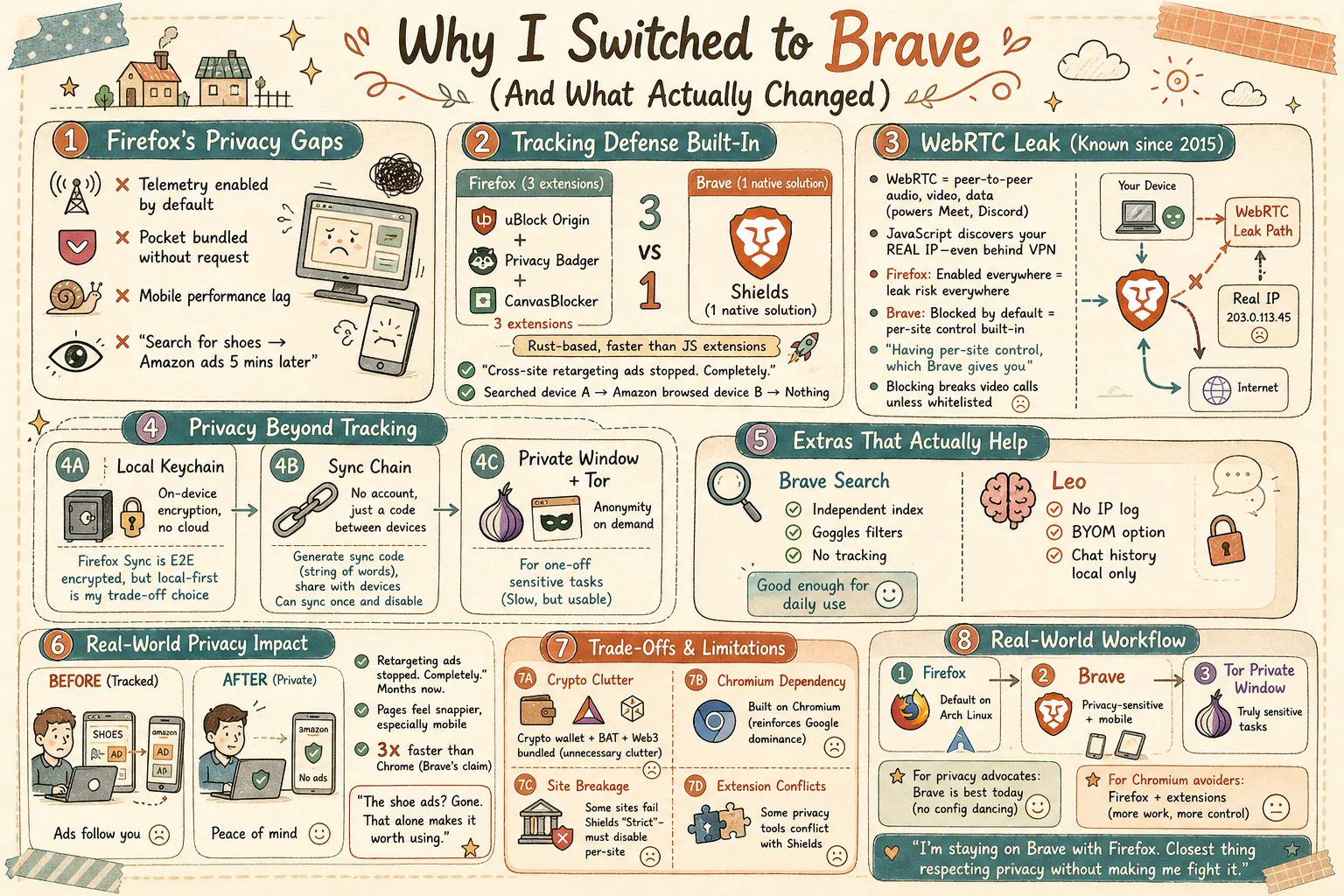
Before Brave
Firefox has been my daily driver on Arch Linux for as long as I can remember — desktop and mobile. I trusted Mozilla enough to store everything there: passwords, bookmarks, session data, the works.
But I care a lot about data security and privacy. I hate the feeling of searching for a pair of shoes and then seeing them promoted on Amazon five minutes later. That cross-site tracking creep is exactly what I want out of my life.
I had Tor Browser installed for when I really needed anonymity, but it’s not practical for daily use.
I started trying Brave on the side — just testing it, seeing how it felt. Over time I found myself reaching for it more and more. Not because I wanted to leave Firefox, but because Brave handled certain things better without me having to configure anything. Firefox is still my primary browser on Arch Linux, but Brave has earned a permanent spot alongside it.
The Breaking Point
Firefox has been making choices I don’t love:
- Telemetry by default — opt-out instead of opt-in.
- Pocket — bundled and pushed. I never asked for this (switched to Raindrop.io).
- Chromium dominance — Firefox is the last real alternative, but losing share means more broken sites.
- Mobile performance — noticeably behind Chrome and Brave in speed and battery.
I wanted something that took privacy seriously without making me fight the browser for it.
Enter Brave.
What I Like
1. Local Keychain (Built-in Password Manager)
Instead of storing passwords in the cloud with Google or even Firefox Sync, Brave stores them locally on-device in an encrypted keychain. I get that Firefox Sync is encrypted end-to-end — I genuinely trust Mozilla — but I like not having my credentials sync through any third-party server at all. Local storage with optional encrypted sync is the right trade-off for me.
2. Sync (That You Only Do Once)
Brave’s sync is anonymized and doesn’t require an account. You generate a sync chain code (a string of words), share it with your other devices, and that’s it. No login, no Google account, no Mozilla account. And you can sync once and never do it again — just pass that code around.
Note on migrating from Firefox: importing from Firefox is a one-time transfer — bookmarks, passwords, history get pulled in once. But Firefox and Brave are two separate applications; there’s no ongoing sync between them. If you make changes in one, you’ll need to manually re-import to keep the other updated.
3. Cross-Site Tracking Protection (Shields)
Brave Shields blocks trackers, scripts, and fingerprinting by default. No configuration needed. On Firefox, I was running uBlock Origin, Privacy Badger, and CanvasBlocker — three extensions to get what Brave does out of the box. And Shields is faster because it’s baked into the browser, not a JavaScript-based extension.
4. WebRTC Control
This one deserves its own section.
What is WebRTC? WebRTC (Web Real-Time Communication) is a browser API that enables peer-to-peer audio, video, and data sharing directly between browsers — no plugins needed. It powers Google Meet, Discord in-browser, and browser-based file sharing.
The privacy problem: WebRTC uses STUN servers to discover your public IP address so it can establish a direct peer-to-peer connection. The issue is that JavaScript on any website can query the WebRTC API and learn your real public IP address — even if you’re behind a VPN or proxy. This is called a WebRTC leak, and it’s been known since at least 2015.
Why this matters: Even with Firefox’s “strict” tracking protection, WebRTC is enabled by default. Your understanding is correct — most people don’t need WebRTC unless they’re using peer-to-peer applications like video calls, torrents (WebTorrent), or real-time collaboration tools. But it’s turned on for every site, meaning any site can potentially discover your real IP.
On Firefox, you can disable it via about:config (media.peerconnection.enabled → false) or install a WebRTC leak prevention extension. On Brave, Shields blocks WebRTC leaks by default in the “Strict” or “Aggressive” mode, and you can control it per-site. No extension needed, no about:config hunting.
My take: WebRTC is useful — I do use Google Meet occasionally. The ideal solution isn’t fully disabling it, but having per-site control, which Brave gives you. Firefox can do this too with extensions, but it’s not built-in.
The trade-off of blocking: Blocking WebRTC breaks any feature that relies on it — video/audio calls (Google Meet, Discord), WebTorrent, screen sharing, and real-time collaboration. (Meet uses relay servers rather than direct P2P, but it still requires the WebRTC API.) You either disable the blocker globally or whitelist each site you need it on. Per-site control (like Brave’s) is the sweet spot.
5. Private Window with Tor
Brave has a “Private Window with Tor” mode. This routes traffic through the Tor network for a single window. It’s not a full Tor Browser — it doesn’t have the same fingerprinting protections — but for one-off sensitive tasks (looking something up that I really don’t want associated with my IP), it’s incredibly convenient. I don’t have to fire up a separate Tor Browser and wait for it to connect. It’s just there.
Performance-wise, it’s Tor — so it’s slow. But for quick lookups, it’s usable. I find myself using this more than I expected.
6. Built-in Ad Blocking
Brave blocks ads and trackers at the browser level. This means pages load faster, use less data, and — yes — the shoe ads stopped. I tested this: I searched for a product on one device, then browsed Amazon on another. Nothing. No retargeting. It’s been months, and the cross-site tracking I hated has effectively disappeared.
Firefox + uBlock Origin achieves the same result, but Brave’s implementation is faster because it operates before the network request is even made (it uses a native Rust-based ad-block engine).
7. Brave Search (Bonus)
I switched to Brave Search as my default. It’s a genuinely independent search index — not Bing reskin — with a “Goggles” feature that lets you apply your own ranking filters. It’s not as good as Google for hyper-local or obscure queries, but it’s good enough for daily use, and it doesn’t track you.
8. Leo (Bonus)
Brave Leo is a privacy-preserving LLM built into the browser. You can ask it questions about the page you’re reading, summarize articles, translate, or just chat.
How private is it? On the free tier, prompts go through Brave’s servers — but no IP is logged, no identifiers are attached, and conversations are not retained or used for training. You don’t even need an account to use it. Or, with Leo’s BYOM (Bring Your Own Model), you can hook up a fully local model (e.g., Llama via Ollama) — everything runs on-device, nothing leaves your machine.
Chat history is stored locally on-device, not in the cloud. You can delete or disable it entirely.
The models available include Mixtral, Claude, and Llama (tier-dependent). I use it mainly for summarizing long docs. Handy, but not a reason to switch on its own.
What I Don’t Prefer
No browser is perfect. Here’s what bugs me about Brave:
Crypto Stuff
Brave bundles a crypto wallet, BAT, and Web3 integrations — none of which I use. You can hide it all in Settings, but it shouldn’t be there by default. It clutters the UI and undercuts the privacy message.
Chromium Dependency
Brave is built on Chromium, which means it inherits its attack surface, reinforces Google’s engine dominance, and swaps in its own sync APIs while the underlying engine stays Google’s. Pragmatically, building a Gecko fork wasn’t viable, so Brave chose Chromium to focus on privacy features. I get it, but I don’t love it.
Site Breakage
Some sites don’t work well with Shields on “Strict” — usually banking sites, Google services, or script-heavy news sites. Dropping to “Standard” or disabling Shields for that site fixes it, but it’s friction.
Extension Compatibility
Most Chrome extensions work, but some — especially privacy tools — conflict with Shields. I’ve had to disable one or two.
Real-World Privacy Difference
The most noticeable change is the tracking. Cross-site retargeting ads stopped. Completely. That alone made it worth it for me.
I also notice pages load faster — not dramatically, but consistently. Brave claims 3x faster than Chrome on some benchmarks. Anecdotally, pages feel snappier, especially on mobile.
My workflow is now:
- Firefox: Default browser on Arch Linux
- Brave: Used alongside for privacy-sensitive browsing and mobile
- Private Window with Tor: For truly sensitive tasks
The Verdict
Would I recommend Brave? Yes, with caveats.
For privacy-conscious users who want something that works out of the box — no extension hunting, no about:config tweaking, no “please disable telemetry” dance — Brave is the best option today. It blocks trackers, manages WebRTC, and gives you Tor integration without sacrificing usability.
For users who want to avoid Chromium entirely, or who need Firefox Containers, or who are philosophically opposed to anything crypto-adjacent — stick with Firefox + uBlock Origin + a WebRTC blocker. It’s a solid setup, just more work to configure.
For me? I’m staying on Brave, with Firefox. It’s not perfect, but it’s the closest thing I’ve found to a browser that respects my privacy without making me fight it. And the shoe ads? Gone. That alone makes it worth using.
Arch Linux, if you’re wondering. Yes, I use xfs encrypted by Veracrypt.