Let me be honest about my credentials, because they are the point of this essay. I have used git for roughly fifteen years. I can clone, commit, branch, merge, push, pull, stash, log, revert, reset. I can fix a rebase mess I created, and I have. By any reasonable definition I know git.
And yet, in two days of working with OpenCode — the terminal AI agent running big-pickle, a 200k-context open-weight LLM — I produced more real automation than in most of those fifteen years. Not because my git skills suddenly improved. Because I finally had someone to wield git, and everything around it, the way an experienced engineer would: thinking, deciding, and building in a loop with me as the one who approves.
The claim of this essay is simple: git is not underrated — everyone knows it is essential. What is underrated is the whole stack working together: OpenCode, git, and the documents and skills I have written, wired into one loop that tracks, stages, analyzes, commits, and pushes — across multiple repos and two accounts — even for a single article. And the reason it works is not the model — it is the orchestration. Here is how I got there.
The confession
I did not discover this because I read about it. I discovered it by watching OpenCode work a real, messy, multi-account problem while I sat at the approval gate.
The setup was genuinely complicated. My articles live in ai-thoughts, which is mirrored to two GitHub accounts (j3ffyang and negtivspace), and those accounts also run two profile repos whose READMEs should show the same portfolio as PORTFOLIO.md. Keeping all of that consistent by hand is the kind of job I have always half-done: it works, then it drifts, then I spend an afternoon fixing it and never finish.
This time, I did not fix it by hand. I described the goal, the agent drew a plan, I approved each step, and over two sessions we built something that never drifts again. And the most uncomfortable part of watching it happen was this: the agent used git better than I do. It inspected clean worktrees, staged only intended files, bumped submodule pointers, pushed to both remotes, and rolled back cleanly when a step went sideways. All the things I could do, but never bothered to orchestrate.
The shift: let the agent drive
The mental model that changed everything is a division of labor:
- I hold the intent and the taste. I say what I want, I state the constraints, and I decide what gets approved.
- OpenCode holds the expertise. It knows git deeply, it can read my repo’s own rules, it can write Python and YAML and Markdown, and it verifies its own work.
- Git is the memory and the safety net. Every step is a commit; every mistake is one
git resetaway. That safety is what makes it safe to let the agent act. - AGENTS.md and SKILL.md are the operating manual. They are how the agent stops relearning my conventions every session and starts behaving like a colleague who knows the project.
- GitHub Actions is the compounding layer. Automation that, once built, runs itself.
None of this requires me to become a git master. It requires me to understand git just enough — enough that when the agent asks approval to run shell or python or gh, I know what those are generally doing, even if I cannot recite every flag. That is a much lower bar, and it is the bar that unlocks everything.
Two days of automation — real examples
Everything below is real, from a single weekend of work. Each row is: what I wanted, what OpenCode + git built, and what it saved me.
| What I wanted | What we built | What it saved |
|---|---|---|
| Stop re-wrapping prose by hand across hundreds of docs | scripts/unwrap_md.py — auto-wraps paragraphs to one-line, preserving code fences, tables, and list nesting, with a --check mode | Hours of manual editing that would have missed files |
| Make filenames consistent across years of articles | A sweep that renamed every doc and image to YYMMDD-slug, fixed all links, and deduplicated drafts | An afternoon of careful find/sed that I would have abandoned |
| Publish my skills to ClawHub without doing it manually | A GitHub Actions workflow per repo that publishes .opencode/skills on every push, with a j3ffyang-only guard and inline CLI handling | No local CLI, no manual publish, and async status no longer looks like a failure |
Keep PORTFOLIO.md honest | gen_portfolio.py — renders it from a template + articles.yaml + git log, with a --check mode | Numbers never drift; CI alerts instead of silently going stale |
| Show the portfolio on both GitHub accounts | Sync PORTFOLIO.md → README.md in j3ffyang/j3ffyang and negtivspace/negtivspace, bump submodule pins | No more copy-paste between two accounts |
| Make that sync automatic forever | A repository_dispatch chain: any PORTFOLIO.md change fires a dispatch, both profile READMEs update themselves | Future updates are zero-touch |
| Diagnose a workflow that failed | gh run view --log — found a missing PROFILE_SYNC_TOKEN secret in minutes | What would have been a UI-digging session |
Look at the last three rows carefully. They form a ladder: first I build a generator, then I use it, then I make using it automatic. That is the compounding effect, and it is the whole reason the weekend was worth it.
To be precise about what “the combination” means: publishing one article does not touch one repo. It reads my AGENTS.md rules, stages only the intended files, analyzes the diff, commits in the right style, pushes to both accounts’ mirrors, bumps the submodule pointer, and triggers the profile-sync workflows that refresh two profile READMEs. That is several repos, two accounts, and a handful of automations — for one Markdown file. None of this is hard as git. As a system, it is the workload of a small team compressed into an afternoon.
The architecture: thought-flow to workflow
What actually happened, reduced to its shape. On my side is a thought-flow; on the agent’s side is a workflow. They meet at the approval gate.
| # | Me — the thought-flow | OpenCode + git — the workflow |
|---|---|---|
| 1 | INTENT — “I want X”, stated plainly | |
| 2 | PROPOSE — a plan with options and a recommendation, diff shown | |
| 3 | APPROVE — read the general shape of the commands, then allow | |
| 4 | EXECUTE — shell / python / gh, in a clean worktree, asking approval for state changes | |
| 5 | VERIFY — git status / git diff, scripts --check, gh run view | |
| 6 | CHECK — review the diff, weigh the tradeoffs | |
| 7 | COMMIT + PUSH — to both remotes | |
| 8 | COMPOUND — GitHub Actions takes over (ClawHub publish, profile sync) | |
| 9 | CODIFY — rule into AGENTS.md, procedure into SKILL.md |
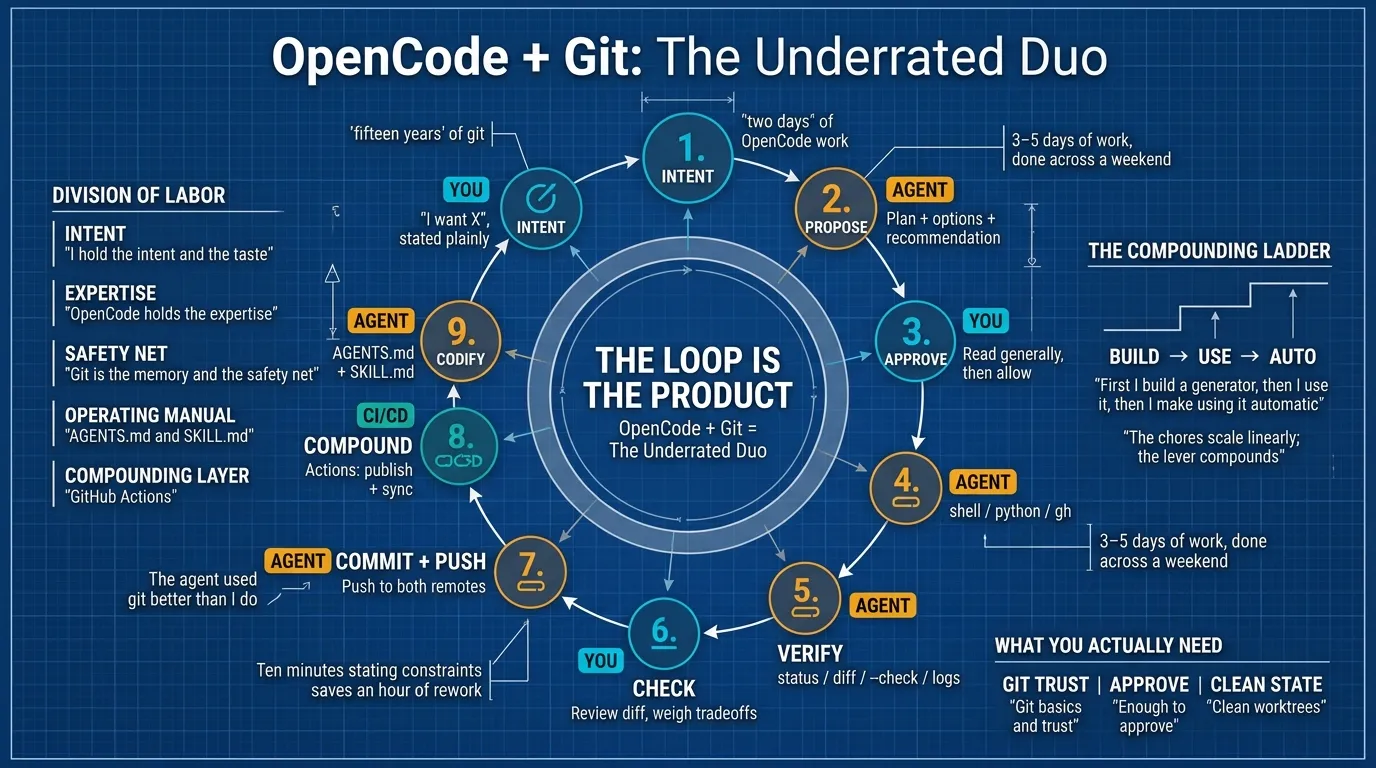
The loop is the real product. Every stage has a job, and skipping one shows up immediately:
- Intent and approval are the expensive stages. Ten minutes stating constraints saves an hour of rework. “No local installs” and “push to both remotes” — stated once, upfront — prevented a whole class of problems.
- Verify before blaming. The profile-sync workflow failed on the first run — both accounts returned 404 when trying to push. I assumed the token was wrong. The agent did not guess; it ran
gh run view --log, found the missingPROFILE_SYNC_TOKENsecret, and showed me exactly which account was short. The whole diagnosis took three minutes. That is the difference between “the tool is broken” and “the config is incomplete” — and the agent knew which one it was because it looked at the real system first. - Codify at the end. Once something works, it becomes a rule (AGENTS.md) or a packaged procedure (SKILL.md). The knowledge survives the session, which is the difference between borrowing expertise and owning it.
Proof: a team of experts
People ask whether an AI agent can really replace the experience of working with experts. I think that is the wrong question. The right question is: can one agent, well-orchestrated, behave like a small team? Watching this weekend, the answer was yes — because each problem pulled a different “specialist” out of the same tool:
- A git expert handled two-remote pushes, submodule bumps, and clean staging — the kind of housekeeping I could do but never systematized.
- A Python developer wrote
unwrap_md.py,gen_portfolio.py, and the sync scripts, then made each one testable via--check. - A CI/CD engineer designed the workflows, the owner guards, and the
repository_dispatchchain that connects a repo to two profile repos. - An SRE diagnosed the failed run, read the logs, and pinpointed the missing secret across two accounts.
- A technical writer drafted AGENTS.md and SKILL.md files.
The same session that edited an essay also debugged a GitHub Actions failure and bumped a submodule. That breadth — not depth in any single domain — is what “a team of experts” actually feels like in practice: a small team’s 3–5 days of work, done across a weekend.
What you actually need to know
This is far less than people fear. Three things made the weekend work:
- Git basics and trust. What a commit, a push, and a reset are — and that git is a safety net: nothing is lost, everything is reversible. That belief is what makes it comfortable to let the agent act.
- Enough to approve. When the agent asks to run a command, I do not need every flag. I need to recognize what it is doing — “this patches these files”, “this pushes to both remotes” — and ask when I am unsure.
- Clean worktrees. Uncommitted noise hides real changes. Clean state makes approval fast and the diff the single source of truth.
What it actually saves
Time, obviously — but the honest accounting is more interesting than “it was fast.”
The direct savings were real: hours of manual file renaming, prose re-wrapping, README drift-fixing, and cross-account copy-paste, compressed into two sessions. But the compounding savings matter more. Every tool we built became capital for the next request. The generator built on day one was used on day two. The workflow built on day two will run forever. Each session ends with the system slightly more automated than it began, which means the next session starts slightly smaller.
That is the difference between using git as a chore and using OpenCode + git as a lever. The chores scale linearly; the lever compounds.
Quick takeaways
If you remember only five things:
- You don’t need to master git — you need to master the approval decision. Know enough to understand what a proposed command does; the agent supplies the mechanics.
- Let the agent drive, but keep the wheel. State intent and constraints precisely, approve each step, and check the diff before it lands.
- The loop is the product. Intent → propose → approve → execute → verify → commit → codify. Every stage has a job; none is skippable.
- Verify before blaming. When something fails, look at the real system (
gh run view, the API, the logs) before concluding the tool is wrong. - Codify what works. Rules go in AGENTS.md, procedures go in SKILL.md, and automation goes in CI — so the work you did once is never done again.
btw, i use arch