Many times, you don’t actually need to go find or search someone else’s custom SKILL.md. You can simply create your own. What follows is real, authentic experience from working with AI over the past few years.
Objective
The point is simple: instead of hunting through skill marketplaces and community hubs for a skill that only half-fits, you write the one you need while you work — and it does exactly what you want, because you wrote it.
The Approach
The approach varies as widely as the jobs you automate — sometimes I build quite complicated workflows for code testing and git automation, but here I’ll use a very simple example.
The examples below are from OpenCode — the agent platform I use every day. But they’d work almost exactly the same on Claude Code, Gemini CLI, OpenClaw, Hermes, or other popular agent platforms. I don’t see much difference among them.
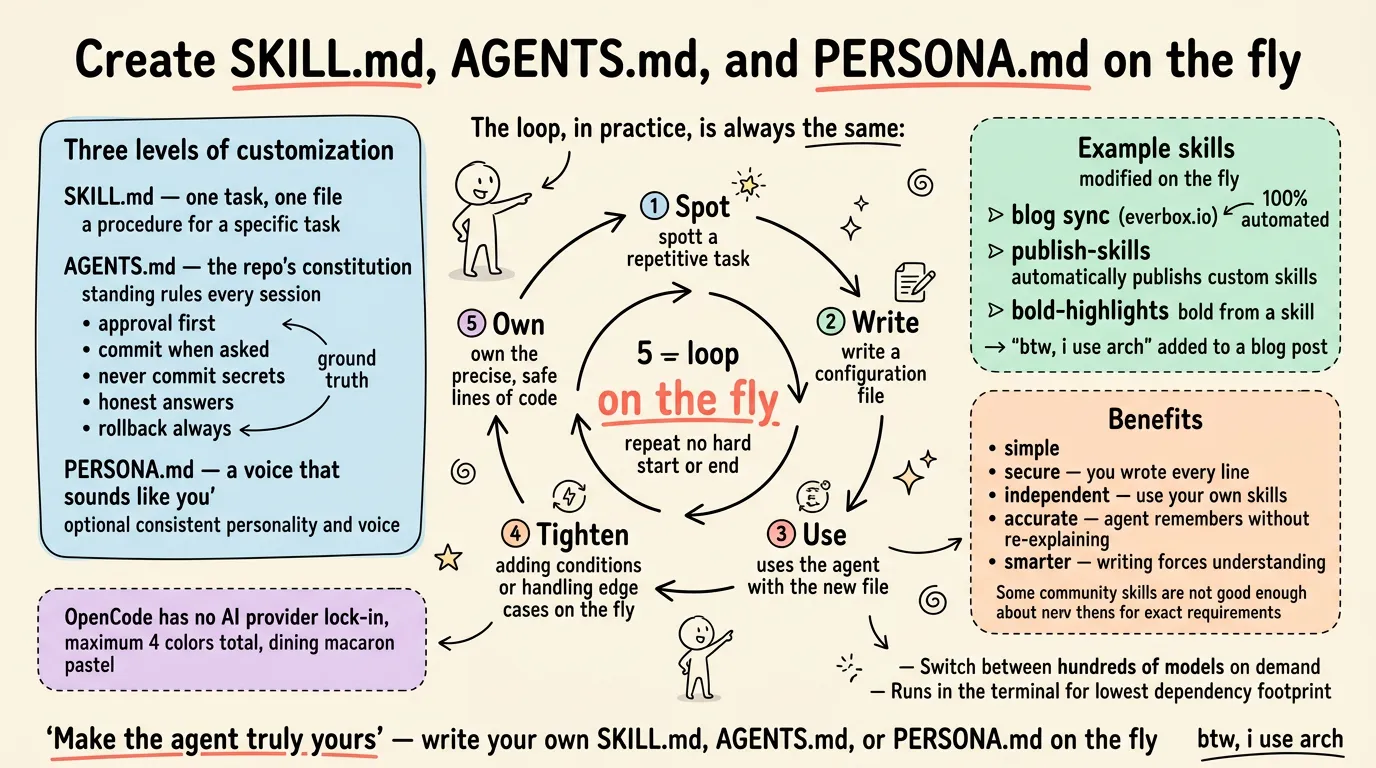
There are basically three levels of customization:
- create (some people call it “record”) a custom SKILL.md while working
- define requirements in AGENTS.md
- add personality in PERSONA.md
Most of the time, I don’t start with the intention of creating a custom SKILL.md. While working, you discover some task that needs to be done over and over again in a clear loop. That’s the moment to create your own custom SKILL.md for automation.
The loop, in practice, is always the same:
- Spot the loop — a task that keeps showing up while you work.
- Write the file — a SKILL.md (or an AGENTS.md rule, or a PERSONA.md voice) describing it precisely.
- Use it the next time it appears — the agent matches the description and takes over.
- Tighten it on the fly — add stricter conditions, handle edge cases, check duplicates.
- Own it — every line is yours, so it’s exact and safe.
Custom SKILL.md
A SKILL.md is a markdown file, usually at .opencode/skills/<skill-name>/SKILL.md, that describes a task the agent can carry out. It states what the skill does, when to use it, and how to do the work. The agent loads it only when it matches its description, so it stays out of the way the rest of the time.
By the way, I’ve created some custom SKILL.md files, such as the one that synchronizes my personal blog at https://everbox.io. I just write markdown, test with npm and Node.js, then commit and push to its dedicated Git repo, all the way across my personal local repo, Git, and Cloudflare. The whole workflow is 100% automated without human touch.
Other examples:
- automatically publish my custom SKILL.md to https://clawhub.ai/j3ffyang/skills/publish-skills
- the bold highlights in this article come from a skill too, which can be referenced at https://clawhub.ai/j3ffyang/skills/bold-highlights — All highlights are automatically generated
- a tiny one: add “btw, i use arch” at the end of each blog post before it’s published
Afterwards, whenever I find a good point or a stricter condition, I modify or optimize my custom SKILL.md on the fly, while checking for duplicate entries if applicable.
AGENTS.md
AGENTS.md is the constitution of a repository. It defines the standing rules that apply every session:
- get approval before any change
- commit only when asked
- never commit secrets
- give honest answers
- always make sure a change can be rolled back
It also holds writing conventions such as filename patterns and the no-hard-wrap rule.
Use specific, explicit words when you talk to your agent. I found that when I use the term ground truth, the agent seriously cross-checks the source — which I love.
The difference from a SKILL.md: a skill is a procedure for a specific task, while AGENTS.md sets the rules for the whole repo. The agent reads AGENTS.md at the start of every session, so it knows the rules before it does anything.
PERSONA.md
PERSONA.md is an optional file (some platforms use a config setting instead) that gives the agent a consistent personality and voice. Some people rely on it heavily; some skip it entirely. Honestly, I don’t use it much in practice — but when you work on content (writing, translations, blog posts) and want the output to always sound like you rather than like a generic assistant, it earns its keep.
One thing to remember: whatever file you create — SKILL.md, AGENTS.md, or PERSONA.md — OpenCode (or whichever agent platform you use) may have to be restarted for the change to be picked up. Don’t assume your new file or rule is live the moment you save it.
Benefit
None of this is marketing copy — every benefit below is ground truth from using it daily.
- simple
- secure — you wrote every line, so you know exactly what it does
- independent — you use your own, not someone else’s
- some community skills are simply not good enough, and they don’t fit your exact requirements
- the workflow can be very accurate and precise, without you having to re-explain it every time — the agent remembers and knows
- writing it forces you to understand the workflow’s logic precisely, which makes you smarter
Reason to Use OpenCode
OpenCode keeps me free from any AI provider lock-in while I can switch between hundreds of models on demand. And it runs in the terminal — the lowest dependency footprint I know.
Next time you catch yourself repeating a task, don’t go hunting in a marketplace — write your own SKILL.md, AGENTS.md, or PERSONA.md on the fly. It’s the fastest way to make the agent truly yours.
btw, i use arch