Your OpenCode Conversations Are One SQLite File
2026-11-19
Thesis: every conversation in OpenCode lives in a single SQLite database, so backing it up is one command — but a naive cp of that file can silently give you a truncated conversation, and a restore on another machine gives you sessions that exist and never appear, because the directory each one was started in is stored as an absolute string.
Goal: a backup whose restore produces identical sessions and messages on a different machine, verified by row counts and an integrity check rather than by hope.
Status: working on this machine. The numbers below were measured on 2026-11-19 with opencode v2.3.0 and SQLite 3.54.1: 366 sessions, 34,262 messages, a 1.7 GB database.
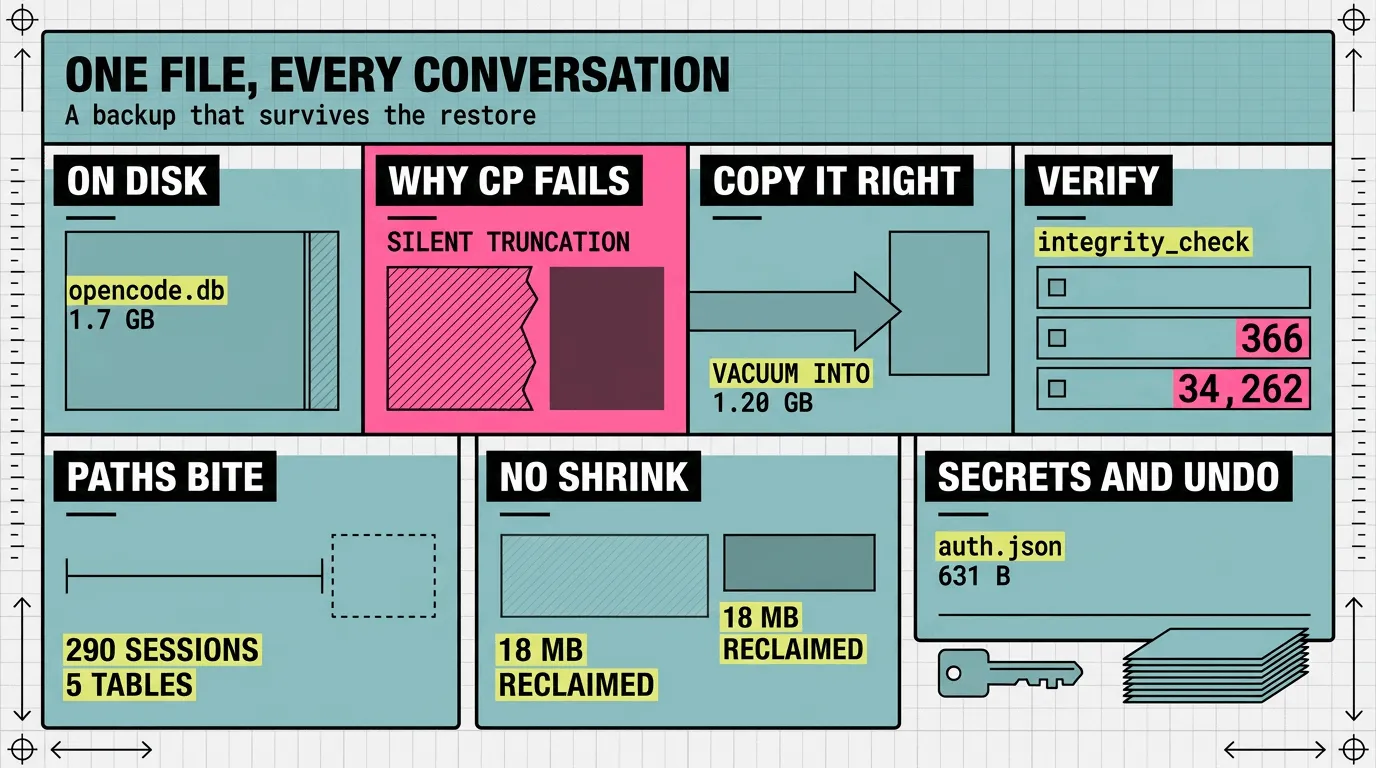
What is actually on disk
Everything OpenCode knows sits in ~/.local/share/opencode/ — that is $XDG_DATA_HOME/opencode, or ~/Library/Application Support/opencode on macOS, which matters the moment you follow this to another machine:
| path | size | what it is | in the backup? |
|---|---|---|---|
opencode.db | 1.7 GB | every session, message, part, project and todo, current and pre-migration | yes |
opencode.db-wal | 16 MB | the committed-but-unmerged tail of the journal | no — merged by SQLite |
auth.json | 631 B | provider credentials, mode 0600 | yes, and it is a secret |
snapshot/ | 207 MB | per-project git object stores behind undo and revert | optional |
shell/ | 2.7 MB | shell tool outputs | optional |
tool-output/ | 1.2 MB | truncated tool results | optional |
log/ | 43 MB | logs | no |
repos/ | empty | unused here | no |
One file. That is the whole story, and it is also why the backup is easy to do wrong.
A session is a transcript, not a memory
This matters before you decide what a backup is worth. A stored session does not teach the agent anything. It is a log: your messages, its replies, every tool call and every tool result, sitting in one row per message. Nothing loads it back unless you ask.
Content reaches a new session through exactly three channels:
- You resume it —
opencode --continuefor the last one, oropencode --session <id>. The whole message list is reloaded into the context window. - You write it to disk —
AGENTS.md,.opencode/skills/, project docs, commit messages. This is the only channel that works with nobody doing anything. - Someone looks it up — a query against the database, or an export. Deliberate, never automatic.
So a new session in the same folder inherits nothing from the old ones. Resuming gives real continuity, but only until the window fills; after that, compaction replaces the older turns with a summary that keeps a tail (roughly 15k tokens by default) and drops the detail — silently.
The practical consequence: a session is excellent as a record and worthless as memory. If a decision matters beyond the session it was made in, it has to land in a file. Everything that survived my own folder restructure did so because it was written into AGENTS.md, not because it was in a transcript.
The archive here makes the point numerically. 366 sessions, 94 messages on average, 607 MB of text — about 159 million tokens. A context window is around 200k. The archive can be grepped; it cannot be consulted. Its value is “look up one old thread when you are puzzled”, which requires you to go looking.
Why cp is the wrong tool
The database runs in WAL mode, which means the most recent transactions may live in opencode.db-wal and not yet in opencode.db. On this machine that sidecar was 16 MB at backup time — larger than today’s entire conversation.
Copy opencode.db while OpenCode is running and you get a file that opens fine, passes a naive look, and is missing the newest work. That is the worst kind of failure: it is silent, and you only discover it the day you need the backup. Copying the -wal alongside does not save you either while a writer is active: the pair is only consistent if no transaction lands between the two copies, which is a race you cannot see and will not notice losing.
SQLite has two ways to do this properly, both safe against a live writer:
| method | time | size | what it does |
|---|---|---|---|
sqlite3 opencode.db ".backup out.db" | 1.2 s | 1.64 GB | page-by-page copy through the online backup API |
sqlite3 opencode.db "VACUUM INTO 'out.db'" | 1.0 s | 1.20 GB | rewrites the whole database into a fresh, compact file |
Both are correct. VACUUM INTO is 27% smaller because it drops the free pages the live file accumulated through months of insert and delete churn, and it is marginally faster here. It also needs no open write transaction and no downtime. I use it for anything I keep.
Verify, do not hope
Two checks, three commands, all cheap, all run against the backup rather than the original:
sqlite3 out.db 'pragma integrity_check;'
sqlite3 out.db 'select count(*) from session_v2;'
sqlite3 out.db 'select count(*) from session_message;'
The result on this backup:
integrity      ok
session_v2     366
session_message 34262
One trap worth knowing: this version keeps live sessions in session_v2 and session_message, while the legacy session (268 rows), message (19,182) and part (74,035) tables are still present from earlier versions. Count both if you are unsure which generation a backup came from. A count that looks wrong is usually a count of the wrong table.
The official path: export and import
The database is not the only way to carry conversations, and for a single thread it is not the right one. OpenCode ships per-session tools:
opencode session export <id> > thread.json    # add --sanitize to redact transcript and file data
opencode session import thread.json           # a local file or a URL
opencode session delete <id>                  # the session and its child sessions
Export writes a clean JSON document: session info, model, cost, token counts, then the messages. Measured on five recent sessions, 10.8 MB of JSON for 9.7 MB of stored text — about 12% overhead, which puts the whole 366-session archive near 680 MB.
Use export when you want one thread, a sanitized transcript to share, or a selective archive. Use the database copy when you want everything at once — projects, permissions, todos, the whole installation — or when rebuilding a machine. Import means a thread can also be handed to someone else, or brought onto a machine that never had your database at all. That is a better fit than database surgery whenever the goal is one conversation rather than an installation.
The part that bites on another machine
Sessions remember the directory they were started in, as a plain absolute string. So does project.worktree.
I learned this the direct way today. I moved twelve project folders up one level, from ~/pool/git/negtivSpace/<project> to ~/pool/git/<project>, all on one machine, no database surgery at all. The TUI then showed an empty session list for the new folder. The conversations were not lost; 290 of them were still filed under directories that no longer existed — 193 in one folder alone:
sqlite3 opencode.db "select count(*), directory from session_v2 group by directory order by 1 desc limit 3;"193 /home/jeff/pool/git/negtivSpace/ai-thoughts
31 /home/jeff/pool/git/negtivSpace/gpd
21 /home/jeff/pool/git/negtivSpace/historyMoving to a new machine is the same problem with a different prefix: a new username, a new home directory, the same empty list. The fix is one statement per table, run against the backup copy before you install it:
sqlite3 opencode.db <<'SQL'
.bail on
update session_v2        set directory = replace(directory, '/old/prefix/', '/new/prefix/') where directory like '/old/prefix/%';
update session           set directory = replace(directory, '/old/prefix/', '/new/prefix/') where directory like '/old/prefix/%';
update project           set worktree  = replace(worktree,  '/old/prefix/', '/new/prefix/') where worktree  like '/old/prefix/%';
update project_directory set directory = replace(directory, '/old/prefix/', '/new/prefix/') where directory like '/old/prefix/%';
update worktree          set directory = replace(directory, '/old/prefix/', '/new/prefix/') where directory like '/old/prefix/%';
SQL
There are five tables with absolute paths, not four, and the fifth one taught me something. project_directory and worktree are keyed on (project_id, directory), so a rename can collide with a row that already exists — which is exactly what happened when I ran this against a live database after moving folders: OpenCode had already written the new path, so renaming the old row violated the primary key and the whole transaction rolled back. The fix is to delete the stale duplicate before renaming:
sqlite3 opencode.db <<'SQL'
.bail on
begin immediate;
delete from worktree
 where (project_id, directory) in (
   select o.project_id, o.directory from worktree o
    where o.directory like '/old/prefix/%'
      and exists (select 1 from worktree n
                   where n.project_id = o.project_id
                     and n.directory = replace(o.directory, '/old/prefix/', '/new/prefix/'))
 );
commit;
SQL
Wrap the whole remap in begin immediate; … commit; and keep .bail on. On a constrained row the transaction aborts and leaves the database untouched, which is a far better outcome than a half-remapped history. Mine did exactly that, and the retry with the dedupe ran clean: 290 sessions off the dead prefix, 0 left behind, 12 worktree rows down to 10.
I rehearsed exactly this on a throwaway copy of the backup before writing it down:
before: sessions under the dead prefix = 290
after:  sessions under the dead prefix = 0
after:  sessions in the moved folder   = 194
projects remapped                      = 11
Worth knowing while you do it: project.id is not derived from the path. The SHA-1 of the old path is 99e2080… and it appears as a directory name under snapshot/, but the project id for that same worktree is d15df4a… and it survived the move unchanged — OpenCode updated its worktree field instead of creating a new project. Session ids are stable too. Only the stored strings need rewriting.
The consequence for snapshot/ is that its internal git stores reference the repository by absolute path in snapshot/<project>/<sha>/objects/info/alternates, one line each — and <sha> is the SHA-1 of that path, which is why the old path’s hash 99e2080… and the new one’s c0e0a7e… sit as sibling directories under the same project. OpenCode did not rewrite the old store when I moved the folder. It created a second one for the new path and left the old one naming a directory that no longer exists, and git does not tolerate that: git rev-list in the old store fails outright with unable to normalize alternate object path. Undo on anything snapshotted before the move is broken, quietly, until you repair it. And the repair is a replace, not an append — appending the live path leaves the dead line in the file, and one dead entry breaks the whole store. Rewrite the stale line to the live path, or delete it.
What the database does not contain
auth.json is 631 bytes and it is the difference between “the conversations are there” and “you can continue them”. It holds provider credentials in clear text and lives at mode 0600 for a reason. Back it up, restore it, and treat the medium it travels on as a secret — this is not a file to put in a public archive or a shared drive.
snapshot/ is the undo history. Without it a restored conversation reads perfectly and every revert quietly stops working.
log/ and repos/ you can skip.
The script
B=~/backups/opencode/$(date +%F)
S=~/.local/share/opencode
ARTICLE=~/pool/git/ai-thoughts/docs/261119-backup-opencode-sqlite-sessions.md
mkdir -p "$B"
rm -f "$B/opencode.db" "$B"/*.tar.zst "$B/MANIFEST.txt" "$B/RESTORE.md" "$B/SHA256SUMS"

sqlite3 -cmd '.timeout 20000' "$S/opencode.db" "VACUUM INTO '$B/opencode.db'"
[ "$(sqlite3 "$B/opencode.db" 'pragma integrity_check;')" = ok ] || { echo 'integrity check failed'; exit 1; }
cp -a "$S/auth.json" "$B/auth.json"
[ -d "$S/snapshot" ]    && tar -C "$S" -cf - snapshot    | zstd -q -3 -o "$B/snapshots.tar.zst"
[ -d "$S/shell" ]       && tar -C "$S" -cf - shell       | zstd -q -3 -o "$B/shell.tar.zst"
[ -d "$S/tool-output" ] && tar -C "$S" -cf - tool-output | zstd -q -3 -o "$B/tool-output.tar.zst"

{
  echo "backup:    $B"
  echo "taken:     $(date -Iseconds)"
  echo "opencode:  $(opencode --version)"
  echo "sqlite:    $(sqlite3 --version | cut -d' ' -f1)"
  echo "integrity: $(sqlite3 "$B/opencode.db" 'pragma integrity_check;')"
  echo "session_v2:      $(sqlite3 "$B/opencode.db" 'select count(*) from session_v2;')"
  echo "session_message: $(sqlite3 "$B/opencode.db" 'select count(*) from session_message;')"
} > "$B/MANIFEST.txt"

[ -f "$ARTICLE" ] && cp "$ARTICLE" "$B/RESTORE.md"
sha256sum "$B"/* > "$B/SHA256SUMS"
The result here, database included:
| file | size |
|---|---|
opencode.db | 1.20 GB |
snapshots.tar.zst | 186 MB (from 207 MB — they are already git objects) |
shell.tar.zst | 201 KB (from 2.7 MB) |
tool-output.tar.zst | 120 KB (from 1.2 MB) |
auth.json | 631 B |
1.4 GB for a complete, verifiable copy of every conversation I have had with this tool. Cheap.
Restoring, briefly
Stop OpenCode. Delete a stale opencode.db-wal and opencode.db-shm first — left over from an older database, SQLite will try to replay them against the restored file. Rewrite the paths on the backup copy (the section above), then copy it into ~/.local/share/opencode/. Extract the archives. Restore auth.json at mode 0600. Then check integrity_check and the row counts against the manifest before you trust it.
I keep a MANIFEST.txt next to each backup with the row counts and the versions that produced it, and a SHA256SUMS beside it, because six months from now the only question worth asking is “was this the good one”, and a checksum answers it.
Each backup folder also carries a RESTORE.md. That one is a snapshot of these steps taken at backup time — not a second document to maintain. This article is the living procedure; the folder copy only exists so the folder explains itself on a machine where the repo is not cloned yet.
What deleting actually removes
opencode session delete <id> removes the session, its children, and the rows that hang off it — messages, parts, inbox entries, blob references. The foreign keys that do this all point at session_v2, and they are tidy about the present. They are not tidy about todo or session_share, whose keys still reference the legacy session table, which is one more reason the old tables matter.
It is not tidy about the past. This database also carries the pre-migration tables — session, message, part — and deleting current-generation rows does not touch them. After I cleared 364 sessions through the CLI, those tables still held 268 sessions, 19,182 messages and 74,035 parts. The text was still on disk, in rows nothing would ever show again.
Before clearing them I checked that all 268 ids also existed in the current table, which made them dead mirrors rather than anything unique. Then one transaction:
sqlite3 opencode.db <<'SQL'
.bail on
begin immediate;
delete from part;
delete from message;
delete from todo;
delete from session;
commit;
SQL
Then the part that surprises people: deleting rows does not shrink the file. The database stayed at 1,678 MB with the pages simply marked free, and a VACUUM on a copy of it produced 18 MB in 0.2 seconds — everything left was one session in progress.
The space is not always in the main file either. The same database later read 32 MB while opencode.db-wal held 569 MB: the log had absorbed the pages the deletes freed, and nothing had folded it back. So reclaiming takes two steps:
opencode service stop
sqlite3 opencode.db 'pragma busy_timeout=20000; pragma wal_checkpoint(TRUNCATE);'
sqlite3 opencode.db 'pragma busy_timeout=20000; vacuum;'
Stop the service first. The pragma answers with three numbers — busy, log, checkpointed. Contention is a leading 1, and that checkpoint has changed nothing. A leading 0 means it went through, and 0|-1|-1 is not a failure: it is what you get when there are no WAL frames left to fold in, which is the state you want. Then vacuum, which is what actually rewrites the file compactly. The order is close, delete, checkpoint, vacuum.
This is also the honest argument against keeping a large archive you never read. Mine held 607 MB of text, roughly 159 million tokens, across 366 sessions — and I had opened almost none of it. What actually improved my decisions was the small distilled layer: the AGENTS.md rules, the articles, the commit messages. The transcripts were a safety blanket, and the backup above is the better place for one.
The honest limits
I have verified this restore on a copy of the same machine, not on a second physical one. What I have proven is that the bytes are consistent, the counts match, and the path rewrite moves 290 sessions from a dead prefix to a live one. What I have not proven is that a fresh OpenCode build on different hardware reads it identically — that experiment is the next backup cycle’s job.
There is also a second copy of my agent configuration that has no remote at all — a local-only repo holding machine wiring and private policy — where the same question applies with no cloud to fall back on. An encrypted archive to a second disk is the answer there, and it is a different article.
And the thing that made me write this down at all: I had a 1.7 GB file representing every conversation I care about, and my backup method was a cp that would have quietly returned a truncated result. The tool that holds your history deserves a better test than “the file exists”.
btw, i use arch