Why I Switched from Ollama to llama.cpp — and What I Learned
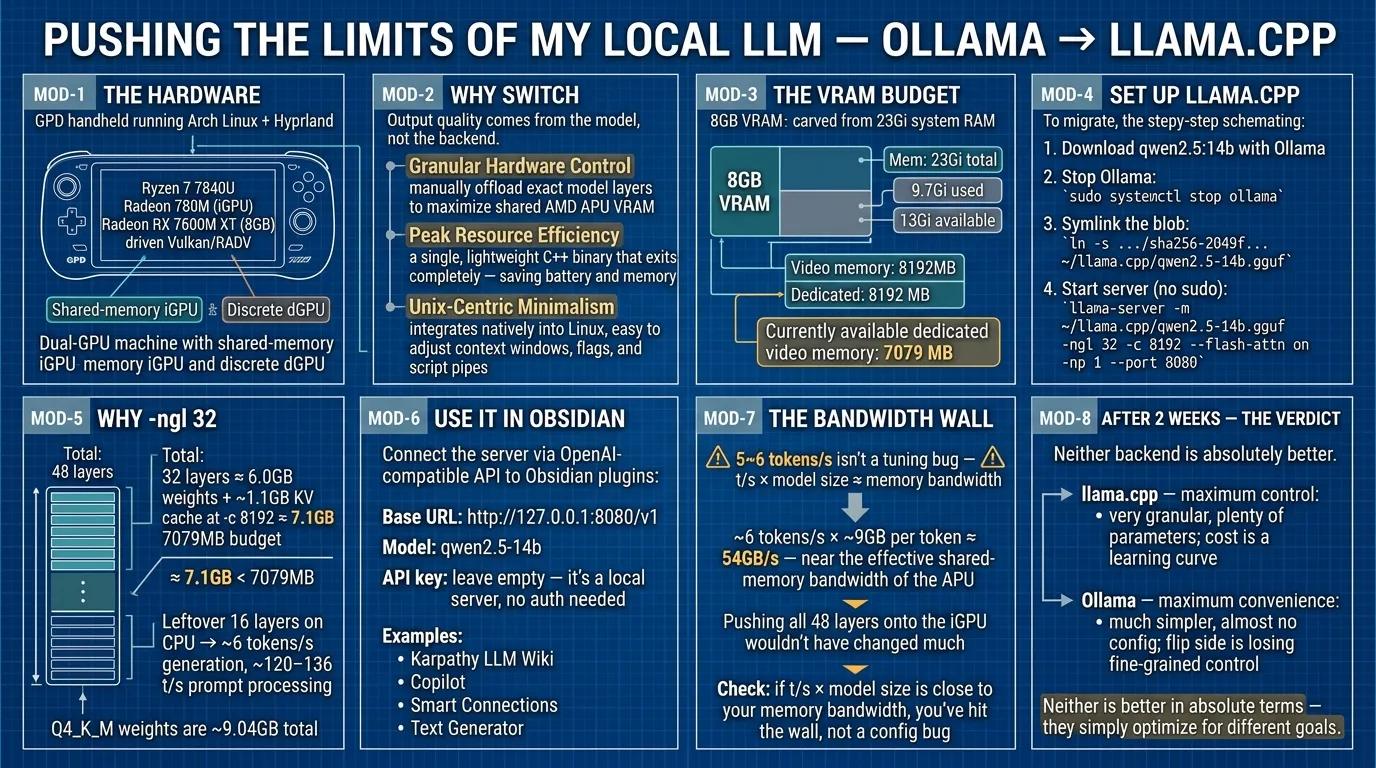
I’m running a local LLM on my Arch Linux + Hyprland setup, and already have qwen2.5:7b with Ollama.
I want to maximize the usage of my hardware.
Therefore I decided to download a slightly bigger model to cover my daily document writing and Python coding work, and switch from Ollama to llama.cpp.
My hardware: a GPD handheld running Arch + Hyprland with an AMD Ryzen 7 7840U — a Radeon 780M integrated GPU plus a discrete Radeon RX 7600M XT (8GB each), driven through Vulkan/RADV. The exact specs don’t matter; what matters is that it’s a two-GPU machine (a shared-memory iGPU and a discrete dGPU), and the point of this article is how to control and tune llama.cpp on such a setup.
The Reason of Switching to llama.cpp from ollama
The switch mainly buys efficiency and hardware control. Output quality is determined by the model itself, not the backend — the better answers in this article come from the larger 14B model, not from llama.cpp. There is more detailed explanation on the web; I’ll just summarize the main points here
- Granular Hardware Control: llama.cpp lets you manually offload the exact number of model layers to maximize your shared AMD APU VRAM without playing it “too safe” like Ollama’s automatic engine. (Ollama actually wraps llama.cpp and exposes a similar knob via
OLLAMA_GPU_LAYERS, but llama.cpp gives you the direct, explicit control.) - Peak Resource Efficiency: It eliminates background daemon overhead by running as a single, lightweight C++ binary that exits completely, saving battery and memory on your GPD device.
- Unix-Centric Minimalism: It integrates natively into Linux (and macOS) environment, allowing you to easily adjust memory context windows, flags, and script pipes on the fly.
Determine How Much vRAM
[jeff@gpd blobs]$ free -h
               total        used        free      shared  buff/cache   available
Mem:            23Gi       9.7Gi       2.3Gi       503Mi        11Gi        13Gi
Swap:           11Gi          0B        11Gi
[jeff@gpd blobs]$ glxinfo | grep -i "video memory"
    Video memory: 8192MB
    Dedicated video memory: 8192 MB
    Currently available dedicated video memory: 7079 MB
This is an AMD APU with unified memory, so the 8GB “VRAM” is carved out of the same 23Gi system RAM that free -h shows — and the 7079MB currently available is what the GPU reports after the desktop has taken its share. That number is a good starting point for picking -ngl below.
On a two-GPU machine, double-check which device llama.cpp actually picked before trusting those numbers — the GPU you measure with glxinfo isn’t necessarily the one the server runs on. llama.cpp defaults to the first device it finds (Vulkan enumerates the iGPU first here, leaving the discrete GPU idle), and the “dedicated VRAM” figure is only what one API reports — on shared-memory devices llama.cpp may see a larger budget, so treat the -ngl math as a heuristic, not a hard limit. To list and override the device, use --list-devices / --device or the GGML_VK_VISIBLE_DEVICES (Vulkan), HIP_VISIBLE_DEVICES (ROCm), or CUDA_VISIBLE_DEVICES (CUDA) env vars — the same approach works whether the second GPU is internal or an eGPU. A smaller model that fits entirely in the discrete GPU’s VRAM typically runs several times faster there.
Download LLM using Ollama
Download qwen2.5:14b
Find out where it is located
[jeff@gpd blobs]$ pwd
/var/lib/ollama/.ollama/models/blobs
[jeff@gpd blobs]$ find . -size +8G -size -10G
./sha256-2049f5674b1e92b4464e5729975c9689fcfbf0b0e4443ccf10b5339f370f9a54
After the download finishes, Ollama won’t be needed and can be stopped
sudo systemctl stop ollamaConfigure llama.cpp to use LLM
Create a symlink to the model downloaded via ollama. First create a local directory to hold the symlink
mkdir -p ~/llama.cpp/

ln -s /var/lib/ollama/.ollama/models/blobs/./sha256-2049f5674b1e92b4464e5729975c9689fcfbf0b0e4443ccf10b5339f370f9a54 \
  ~/llama.cpp/qwen2.5-14b.gguf
Change the sha256 hash to yours
Also adjust the blob path if needed — it depends on how Ollama was installed (/usr/share/ollama/.ollama/models/blobs for the systemd package, /root/.ollama/models/blobs for the official installer). The blob is tied to that exact download: re-pulling a different quantization or ollama rm invalidates the hash. If you’d rather not depend on Ollama at all, download the GGUF directly with hf download Qwen/Qwen2.5-14B-Instruct-GGUF qwen2.5-14b-instruct-q4_k_m.gguf --local-dir ~/llama.cpp/
Start the server (no sudo needed — it runs as your user and stays reachable at localhost)
[jeff@gpd ~]$ llama-server -m ~/llama.cpp/qwen2.5-14b.gguf -ngl 32 -c 8192 --flash-attn on -np 1 --port 8080-ngl 32 offloads the first 32 of Qwen2.5-14B’s 48 layers to the GPU and leaves the rest on the CPU. Why 32? The Q4_K_M weights are ~9.04GB in total, so 32 layers ≈ 6.0GB of weights plus ~1.1GB of KV cache at -c 8192 ≈ 7.1GB — just under the 7079MB available. Those leftover 16 layers running on CPU are exactly why generation speed in the log below lands around 6 tokens/s while prompt processing reaches ~120–136 t/s.
You’d see something like
...
0.02.762.489 I srv  llama_server: model loaded
0.02.762.494 I srv  llama_server: listening on http://127.0.0.1:8080
Configure Obsidian using llama.cpp
llama-server already exposes an OpenAI-compatible API at http://127.0.0.1:8080/v1, so any Obsidian plugin that accepts a custom OpenAI-compatible endpoint can talk to it. Using the Karpathy LLM Wiki plugin (same one as the previous article):
- Start
llama-serverfirst (see above). - Obsidian > Settings > Karpathy LLM Wiki.
- Pick provider: OpenAI (or “custom endpoint”/OpenAI-compatible if your version lists it).
- Set Base URL to
http://127.0.0.1:8080/v1. - Set Model to
qwen2.5-14b(type it manually or fetch from/v1/models). - Leave the API key empty — it’s a local server, no auth needed.
- Click Test Connection, then Save Settings.
That’s it — your notes now query the local 14B model. The same endpoint also works with any other OpenAI-compatible Obsidian plugin (Copilot, Smart Connections, Text Generator, …) for document writing and Python coding assistance.
Tuning
To maximize local LLM capability through llama.cpp, the parameters can vary depending on your GPU or hardware spec, so it’s important to tune them.
One strong reason to run everything through the command line is that any error (or warning) message is printed clearly, which helps debugging. If you get an error, check Google or similar first. Here’s my printed log
...
0.00.038.015 I cmn  common_param: common_params_print_info: verbosity = 3 (adjust with the `-lv N` CLI arg)
0.00.038.358 W srv  llama_server: -----------------
0.00.038.360 W srv  llama_server: CORS is set to allow all origins ('*') and no API key is set
0.00.038.360 W srv  llama_server: this can be a security risk (cross-origin attacks)
0.00.038.360 W srv  llama_server: more info: https://github.com/ggml-org/llama.cpp/pull/25655
0.00.038.360 W srv  llama_server: -----------------
0.00.039.555 I srv    load_model: loading model '/home/jeff/llama.cpp/qwen2.5-14b.gguf'
0.00.268.690 W load: control-looking token: 128247 '</s>' was not control-type; this is probably a bug in the model. its type will be overridden
0.02.757.937 I srv    load_model: initializing, n_slots = 1, n_ctx_slot = 8192, kv_unified = 'false'
0.02.762.489 I srv  llama_server: model loaded
0.02.762.494 I srv  llama_server: listening on http://127.0.0.1:8080
1.07.002.103 I slot get_availabl: id  0 | task -1 | selected slot by LRU, t_last = -1
1.07.002.163 I slot launch_slot_: id  0 | task 0 | processing task, is_child = 0
1.22.014.086 I slot print_timing: id  0 | task 0 | prompt processing, n_tokens =   2048, progress = 0.42, t =  15.01 s / 136.43 tokens per second
1.41.426.409 I slot print_timing: id  0 | task 0 | prompt processing, n_tokens =   4096, progress = 0.84, t =  34.42 s / 118.99 tokens per second
2.08.679.214 I slot print_timing: id  0 | task 0 | n_decoded =    100, tg =   5.88 t/s, tg_3s =   5.88 t/s
2.11.798.583 I slot print_timing: id  0 | task 0 | n_decoded =    118, tg =   5.86 t/s, tg_3s =   5.77 t/s
A few notes on this log: the control-looking token: 128247 '</s>' warning is a known harmless artifact of some Qwen GGUF re-quants, so you can ignore it. The CORS + no-API-key warning is acceptable because llama-server binds to 127.0.0.1 by default — it’s only reachable from your machine; if you ever expose it with --host 0.0.0.0, set --api-key first. And -np 1 allows one parallel request — raising it to 2 keeps the UI responsive while generating, but the KV cache roughly doubles, so keep an eye on the 7079MB budget.
We can see the local LLM handles roughly 5~6 tokens/second, which seems low — the bottleneck is the 16 layers left on the CPU plus the shared memory bus on this APU — but it maintains better output quality than qwen2.5:7b. Certainly, if you prioritize faster processing — often a few times faster — you could try qwen2.5:7b for similar use cases like knowledge management with Karpathy LLM Wiki.
One more check before blaming tuning: multiply your generation speed by the model size. At ~6 tokens/s the 14B model reads ~9GB per token, which works out to ~54GB/s — already near the effective shared-memory bandwidth of this APU, so pushing all 48 layers onto the iGPU wouldn’t have changed much. On any machine, if t/s × model size is close to your memory bandwidth, you’ve hit the wall, not a config bug.
After 2 Weeks of Testing
Two weeks of daily use later, the verdict is a trade-off between control and convenience.
llama.cpp — maximum control
- Very granular control: plenty of parameters to tune so the model maximizes its power and capability locally, specifically on your hardware.
- The cost is a learning curve, with back-and-forth checks against Google and/or the official documentation.
Ollama — maximum convenience
- Much simpler: install, almost no further config, start using immediately.
- The flip side: you hand the tuning decisions to an automatic engine and lose the fine-grained control.
Neither is better in absolute terms — they simply optimize for different goals.